Are you tired of juggling fifteen different apps just to dim the lights, check the front door, and preheat the oven? You aren’t alone. As the average household now contains over 20 connected devices, the fragmentation of the Internet of Things (IoT) has become a primary pain point for homeowners. The solution lies in the evolution of the web smart home—a unified approach that allows you to control your entire ecosystem through a single, powerful web interface. In this guide, we will explore how to transition from app-fatigue to a streamlined, browser-based command center that puts you back in control.
Understanding the Web Smart Home Concept
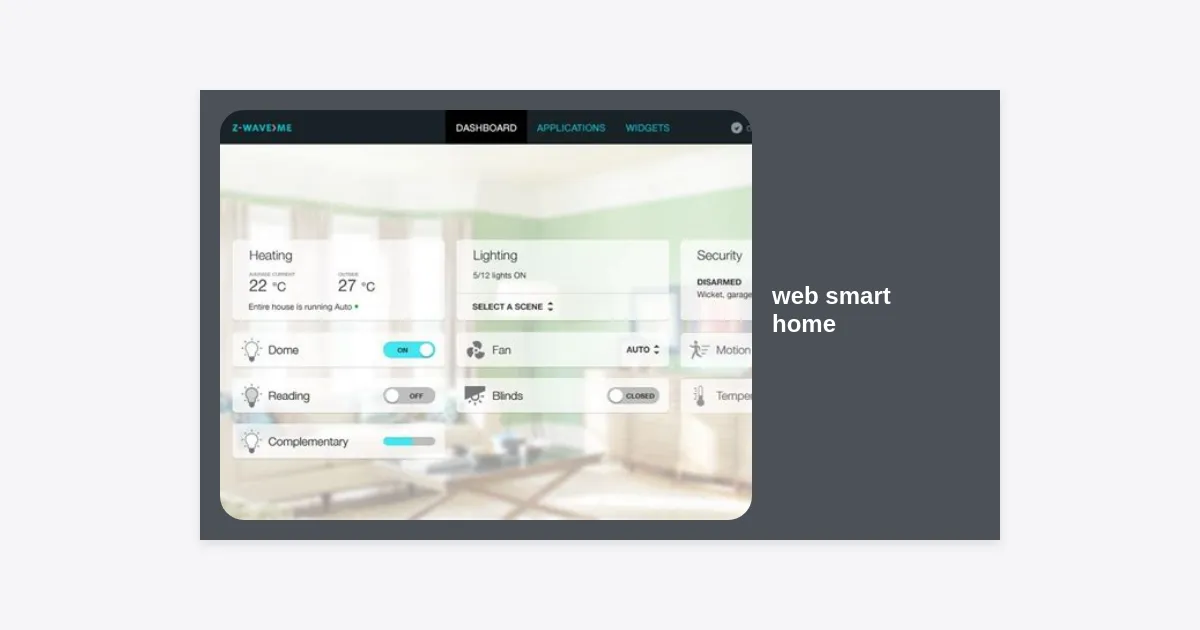
A web smart home refers to a configuration where devices and local hubs are managed through a centralized web interface rather than relying solely on proprietary mobile applications. While mobile apps are convenient for quick adjustments on the go, a web-based dashboard provides a “God’s eye view” of your entire property. It leverages standard web protocols (HTTP, WebSockets, and MQTT) to create a bridge between disparate hardware brands.
In the early days of home automation, every manufacturer built a “walled garden.” If you bought Philips Hue bulbs, you used the Hue app. If you bought a Nest thermostat, you used the Google Home app. A web smart home removes these walls. By using a local server or a cloud-based aggregator, you can view your security cameras, energy consumption, and lighting scenes all on one screen—be it a tablet mounted on the wall or a laptop at your desk.
“The goal of a true smart home isn’t to make everything remote-controlled; it’s to make the technology invisible and the management effortless.”
The Top Benefits of Browser-Based Smart Home Control
Why should you care about a web smart home interface? Beyond the obvious aesthetic appeal of a unified dashboard, there are several practical advantages that improve the long-term viability of your automation setup.
1. Cross-Platform Accessibility
Mobile apps are often optimized for specific versions of iOS or Android. A web smart home interface is platform-agnostic. Whether you are using a Windows PC, a Linux workstation, a Kindle Fire, or an old iPad, as long as it has a modern web browser, you have full control. This extends the life of your hardware and ensures that every member of the family can access controls regardless of their device preference.
2. Advanced Customization and Visualization
Standard apps are designed for the masses, which means they offer limited layout options. Web-based dashboards, such as those created in Home Assistant or OpenHAB, allow for deep customization. You can create 3D floor plans, integrate real-time weather maps, and use CSS to style your buttons and sliders exactly the way you want.
3. Data Sovereignty and Analytics
Most consumer apps only show you what is happening now. A robust web smart home setup typically includes a database (like InfluxDB) that logs sensor data over time. This allows you to visualize your energy usage, temperature fluctuations, and motion patterns using tools like Grafana. Seeing these data points in a browser-based chart helps you make informed decisions about home efficiency.
Essential Platforms for a Unified Web Experience
To build a web smart home, you need a “brain” that can talk to all your gadgets. Here are the top contenders in the market today:
- Home Assistant: The gold standard for DIY enthusiasts. It is an open-source platform that supports over 2,000 integrations. Its “Lovelace” UI is a powerful web interface that can be customized to an infinite degree.
- Hubitat Elevation: A local-first hub that offers a built-in web dashboard creator. It is perfect for those who want privacy without the steep learning curve of a full server setup.
- OpenHAB: Highly flexible and developer-centric, this platform excels in environments with complex logic requirements and professional-grade hardware.
- Homey: A more user-friendly, plug-and-play gateway that offers a sleek web app for flow creation and device management.
Step-by-Step Guide to Setting Up Your Web Dashboard
Creating your first web smart home dashboard doesn’t have to be a daunting task. Follow these steps to get a basic command center up and running.
Step 1: Choose Your Host Hardware
For a reliable experience, you should run your smart home server on a dedicated device. A Raspberry Pi 4 or an old Intel NUC are excellent choices. Using a dedicated machine ensures that your web smart home is always available and isn’t interrupted by your computer’s updates or reboots.
Step 2: Install Your Automation Software
Flash your chosen software (like Home Assistant OS) onto an SD card or SSD. Once the device boots up, you can access the initial setup wizard by typing its IP address into your browser. This is the moment your house officially becomes a web smart home.
Step 3: Integrate Your Devices
The software will automatically scan your network for compatible devices. Add your smart bulbs, switches, and sensors. For devices that don’t support Wi-Fi, you may need a Zigbee or Z-Wave USB dongle to bridge them into your web hub.
Step 4: Design Your Layout
Use the built-in Editor to add “cards.” A good layout usually includes:
- Header: Time, date, and house status (e.g., “Home,” “Away,” “Night”).
- Main Controls: Most-used lights and the thermostat.
- Media: What’s playing on Spotify or the TV.
- Security: Camera feeds and door lock status.
Security and Privacy in a Web-Connected Ecosystem
When you move your controls to a web smart home interface, security must be your top priority. Opening a web interface to the internet can be risky if not handled correctly. According to recent cybersecurity reports, unsecured IoT devices are among the most exploited entry points for home network breaches.
Always use Two-Factor Authentication (2FA) for any web-accessible dashboard. If you are accessing your web smart home from outside your house, do not simply open a port on your router. Instead, use a secure VPN (like WireGuard) or a reverse proxy (like Nginx Proxy Manager) with an SSL certificate. This ensures that the data traveling between your browser and your home is encrypted and authenticated.
Furthermore, one of the biggest draws of a local web smart home is that your data stays on your hardware. Unlike cloud-based assistants that may send your voice recordings or usage habits to remote servers, a local hub keeps your privacy intact. Ensure your hub is configured to prioritize local communication over cloud polling whenever possible.
Practical Automation Recipes for the Modern User
A web smart home is truly “smart” when it acts on your behalf. Here are three actionable automation recipes you can implement via your web dashboard today:
1. The “Work from Home” Scene
Trigger: Motion detected in the office between 8:00 AM and 9:00 AM, Monday to Friday.
Action: Turn on desk lights, set the coffee maker to active, and adjust the office temperature to 72°F. Your web smart home dashboard can display a “Work Mode” badge to show the automation is running.
2. The Energy Saver
Trigger: Nobody home for more than 30 minutes (determined by phone GPS or lack of motion).
Action: Turn off all lights, lower the HVAC, and ensure the garage door is closed. This use case highlights the efficiency of a web smart home in reducing utility bills.
3. The Smart Security Night Patrol
Trigger: Time is 11:00 PM.
Action: Lock all smart bolts, enable the outdoor perimeter sensors, and dim the indoor lights to 5%. If any sensor is tripped, your web smart home interface can automatically pop up the relevant camera feed on your bedroom tablet.
The Future of the Web Smart Home
The industry is moving toward a standard called Matter. This protocol is designed to ensure that devices from different manufacturers work together seamlessly. For the web smart home enthusiast, this is a game-changer. Matter-over-Thread will allow for faster, more reliable communication that is easily exposed to web-based controllers.
We are also seeing the integration of Generative AI into web dashboards. Imagine typing into your web smart home command bar: “Make the living room feel cozy for a movie night,” and having the AI automatically dim the lights, close the shades, and suggest a movie based on your history. The browser serves as the perfect canvas for these complex, AI-driven interactions.
Conclusion: Your Path to a Seamless Home
Transitioning to a web smart home isn’t just about technology; it’s about lifestyle. It’s about moving away from the frustration of disconnected apps and toward an integrated, intuitive environment that works for you. By choosing the right platform, focusing on security, and designing a dashboard that fits your family’s needs, you can unlock the full potential of your smart devices.
Key Takeaways:
- A web smart home provides a single point of control via any web browser.
- Platforms like Home Assistant offer the most flexibility for a unified dashboard.
- Security should be managed through VPNs and 2FA rather than open ports.
- Automation allows your home to respond to your habits, saving energy and increasing comfort.
Ready to start your journey? Begin by auditing your current devices and choosing a hub that supports a robust web interface. Your future web smart home is only a few clicks away.